
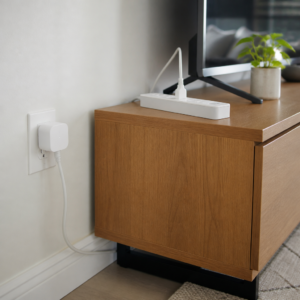
Many gadgets quietly sip electricity even when they look switched off. The good news is that one click or a simple schedule can put them truly to sleep, so your home stays just as comfy and your energy dollars stay with you.
What Is Standby Power, Anyway?
Gather round, class. Standby power (some folks call it “phantom” power) is the small amount of electricity that many devices use while they are plugged in but not doing anything useful. That glowing clock on the microwave, the little red light on the TV, the charger left in the wall: each one is ready and waiting, and waiting uses a bit of energy. One device alone is tiny. A whole house full of them, running all day and all night, can add up over a year.
How to Find and Tame Your Energy Sippers
- Do a glow walk. Some evening, turn off the main lights and stroll through your home. Every little light or warm power brick is a clue.
- Group by spot. Most homes have a few clusters: the TV corner, the computer desk, the kitchen counter, and the nightstand. These are your best places to save.
- Sort what can sleep. Game consoles, sound bars, DVD players, printers, speakers, and phone chargers can usually be fully off when not in use.
- Know what should stay on. Keep the refrigerator, freezer, medical equipment, internet router (if you need it overnight), security devices, and anything that must keep a schedule plugged in and powered.
- Unplug chargers when the battery is full. It is a tiny habit with a nice tidy feeling, too.
Try It Free First
You may already own the tools for this lesson. Many homes have an ordinary power strip with an on and off switch tucked behind the TV. Plug your entertainment gear into it, then flip the switch off at bedtime. Also peek in your device menus. Many TVs and game systems have an “energy saving” or “eco” setting that reduces what they use while waiting. Turning those on costs nothing at all.
Where Smart Plugs and Switched Power Strips Fit In
If reaching behind furniture is not your idea of fun, these handy helpers do the remembering for you.
- Switched power strips put a big, easy-to-reach switch on a group of devices. Some have individual switches for each outlet, so you can leave one device on and turn the rest off.
- Smart plugs plug into the wall, and you plug a device into them. Using a phone app or a voice assistant, you can set schedules, like turning the coffee maker corner off at night and the lamp on at dusk. Some models even show how much energy a device uses, which makes a fun little science project.
- Advanced or “smart” power strips can sense when a main device, like a TV, turns off, and then switch off the extras plugged in with it.
Smart plugs suit folks who enjoy using a phone app, while a simple switched strip is perfect for anyone who likes things easy and app-free. Either way, the goal is the same: off really means off.
What to Look For When Comparing
- Safety listing: look for a recognized safety certification mark such as UL or ETL.
- Power rating: make sure the plug or strip handles the devices you plan to connect.
- Switch placement: a switch on top or on a remote is easier to reach than one on the back.
- App and Wi-Fi needs: for smart plugs, check that it works with your phone and home network.
- Size: slim plugs leave room for the second outlet.
- Reviews and return terms: compare a few listings before choosing.
Professor Ima’s Wrap-Up
Every gadget deserves a good night’s sleep, and so does your budget. Take a glow walk, group your devices, and let a switch or a schedule tuck them in. Small savings that happen every hour of every day are my very favorite kind. Gold star for you!
As an Amazon Associate, Cheap101 earns from qualifying purchases, at no extra cost to you. Browse more handy finds in the Student Store.